AUTOMOTIVE CHATBOT
Automotive Chatbot for Car Dealerships
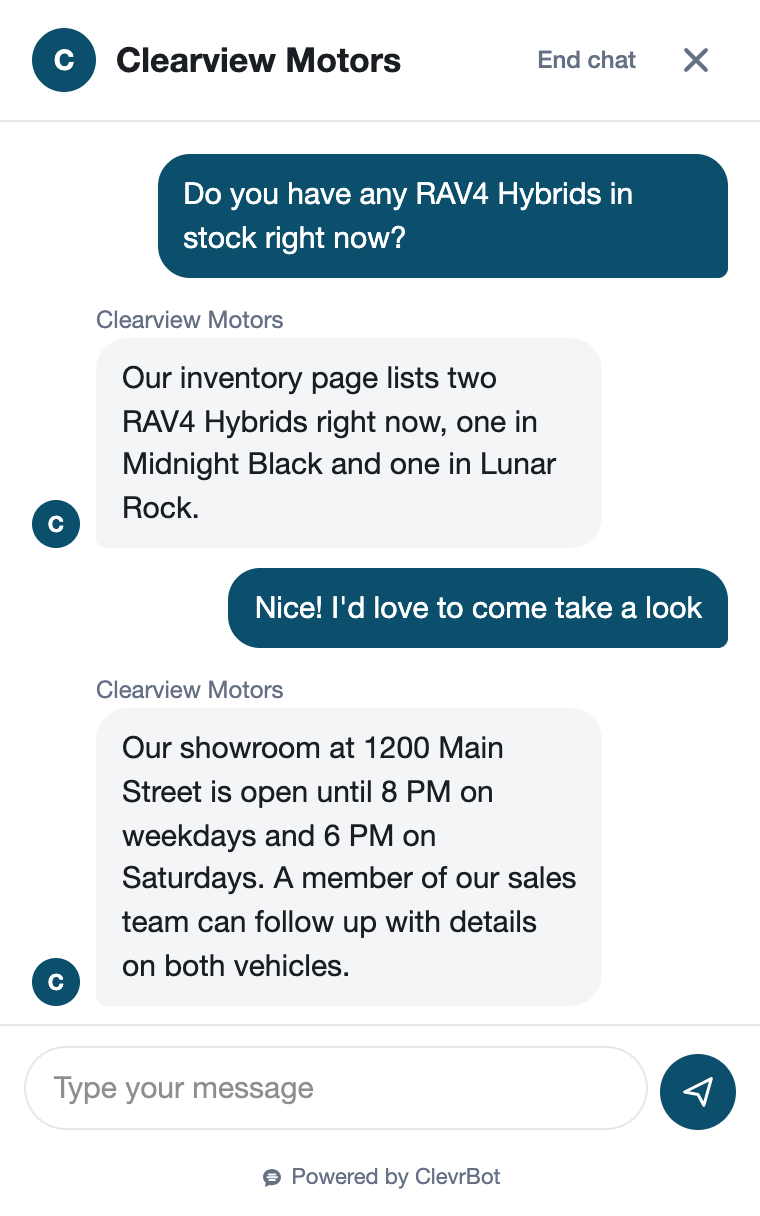
ClevrBot is an automotive chatbot that answers shoppers from your dealership’s own vehicle, finance, trade-in, and service pages at any hour. It captures their contact info for your sales team and leaves pricing, payments, and credit decisions to your people.
71%
of vehicle buyers started shopping unsure which vehicle they would buy.
66%
of buyers considered both new and used vehicles, up from 57% in the prior study.
25%
of new-vehicle buyers used AI tools while shopping, and cited real-time answers as a top benefit.
What visitors ask
What car shoppers ask an automotive chatbot
These come from real dealership FAQ pages and the chat questions dealers discuss on industry forums, grouped by where the answer lives on your site.
Vehicles and inventory
Is the car I saw on your website still available?
Answered from: vehicle detail pages
Do you have any 4×4 crew cab trucks in stock?
Answered from: inventory pages
What’s the difference between the XLE and Limited trims?
Answered from: model and trim pages
Do you sell certified pre-owned vehicles?
Answered from: CPO program page
Financing and trade-ins
Can I get approved with bad credit?
Answered from: finance page
Can I use financing from my credit union?
Answered from: finance FAQ
Will you buy my car even if I don’t buy one from you?
Answered from: sell or trade-in page
I still owe on my car. Can I trade it in?
Answered from: trade-in page
Buying and service
What documents should I bring?
Answered from: buying process FAQ
Can I take the car home the same day?
Answered from: buying process FAQ
Do you deliver to buyers out of state?
Answered from: delivery page
What are your service department hours?
Answered from: service page
Before and after
The 11 PM trade-in question
A truck shopper with a loan on their sedan
At 11 PM, a shopper is looking at a used pickup on your site. They still owe money on their sedan, and they want to know if the truck is still there and whether you’ll take the car in trade. Your showroom closed two hours ago.
Without ClevrBot
- The “check availability” form sends a lead that sits until morning
- Your site never says whether you take trades with a loan balance
- They open a competitor’s site and ask the same questions there
- By the time your team calls, they’ve planned a visit somewhere else
With ClevrBot
- ClevrBot answers from the truck’s page and notes that your team confirms availability
- It explains how you handle trade-ins with a loan, using your trade-in page
- It lists what to bring, like a license, proof of insurance, and loan payoff details
- It captures their email and name, and your sales team gets an email alert
Setup guide
How to set up your automotive chatbot
ClevrBot is a WordPress plugin that answers only from the content you select, so start by checking where your vehicle listings actually live.
Check where your inventory lives
ClevrBot learns from the WordPress post types and HTML files you choose. If your vehicle listings are WordPress posts, include them. If they load from an outside inventory feed, ClevrBot won’t see individual vehicles, so point it at your model, finance, trade-in, and service pages instead.
Refresh content when inventory changes
Content refreshes are on-demand, so upload your content again after big inventory changes. Unpublish sold-vehicle pages instead of just unlinking them, because ClevrBot learns from published pages even when nothing links to them. Then ask about a car you just sold to confirm it’s gone.
Write finance and trade-in pages in plain words
Cover bad credit, first-time buyers, outside financing, and trades with a loan balance, which dealers report as common chat questions. Explain the steps, not the numbers. Leave rates and payment examples to your finance team.
Answer the buying basics on one FAQ page
List what to bring, whether buyers can take the car home the same day, how test drives work, and your delivery options. Add separate hours for sales, service, and parts. Short, specific answers here save your team repeat calls.
Give service its own pages
Service customers ask about hours, which makes you work on, loaner cars, and shuttles. Put those answers on your service pages and link to your online service request tool. ClevrBot points customers there and does not set service times itself.
Turn on alerts and review chats
Turn on email notifications so your sales and service teams hear about new conversations quickly. Read your chat history each week. Add answers for any question your pages missed, then upload your content again.
Know the limits
What ClevrBot will not do for your dealership
It does not quote prices, payments, or trade values
Instead: It shares what your pages publish and captures contact info. Your sales team works the numbers, including out-the-door totals.
It does not make financing decisions
Instead: It can’t run credit, pre-approve anyone, or quote rates. Keep payment talk with your finance team, since stating a payment amount or down payment in a credit ad triggers extra Truth in Lending disclosures.
Inventory answers are only as current as your last upload
Instead: A car sold this morning can still show until you refresh your content. Add a line to your vehicle pages saying your team confirms availability, so ClevrBot passes that along.
It does not set test drives or service visits
Instead: It captures the shopper’s email and name so your team can reach out and set the time.
It does not hold vehicles or take deposits
Instead: Holds, deposits, and paperwork happen with your staff or your own online buying tools.
Getting started
How It Works
Install the Plugin
Works with any WordPress theme.
Select Your Content
Choose which pages to index.
Start Capturing Leads
Answer questions 24/7.
Can an automotive chatbot tell shoppers if a car is still available?
ClevrBot answers from your vehicle pages as of your last content upload, so it can’t know about a car that sold an hour ago. Add a line to your vehicle pages saying your team confirms availability, and refresh content after big changes. ClevrBot then captures the shopper’s contact info so a salesperson can confirm.
Does ClevrBot work with my dealer website platform?
ClevrBot is a WordPress plugin, so your site needs to run on WordPress. Some dealer sites load inventory from an outside feed instead of WordPress posts. In that case ClevrBot still answers from your pages about models, financing, trade-ins, and service, but it won’t see individual vehicle listings.
Will it quote payments or approve credit?
No, ClevrBot never calculates payments, quotes rates, or runs credit. It explains your finance process from your pages, such as whether you work with first-time buyers or outside lenders. Anyone ready to talk numbers leaves their contact info, and your finance team takes it from there.
Can it answer service department questions?
Yes, from your service pages, where customers look for hours, which makes you service, loaner cars, and typical wait times. Publish those answers and link to your online service request tool, and ClevrBot will point customers there. It does not set service times or diagnose problems.
Can it help Spanish-speaking shoppers?
Yes, ClevrBot recognizes the shopper’s language and replies in it, using your English pages. That lets you answer inventory and trade-in questions at night for shoppers who prefer another language. Make sure someone on your sales team can follow up in that language.
Where do the leads go?
You get an email alert as soon as a conversation starts, so your BDC or sales team can respond quickly. Every chat is saved in your ClevrBot chat history in WordPress, along with any email and name the shopper shared. Your team follows up and logs the lead in your own system.
What does it cost?
The Free plan includes 100 messages, and no credit card is needed. The Starter plan is $49 per month for 1,000 messages and includes setup support, with no contract. Extra 500-message packs roll over month to month, as shown on the pricing page.
Put an automotive chatbot on your dealership site
Install the WordPress plugin, pick your pages, and start with 100 free messages. No credit card required.