REAL ESTATE CHATBOT
A Real Estate Chatbot That Answers Buyers While You’re at Showings
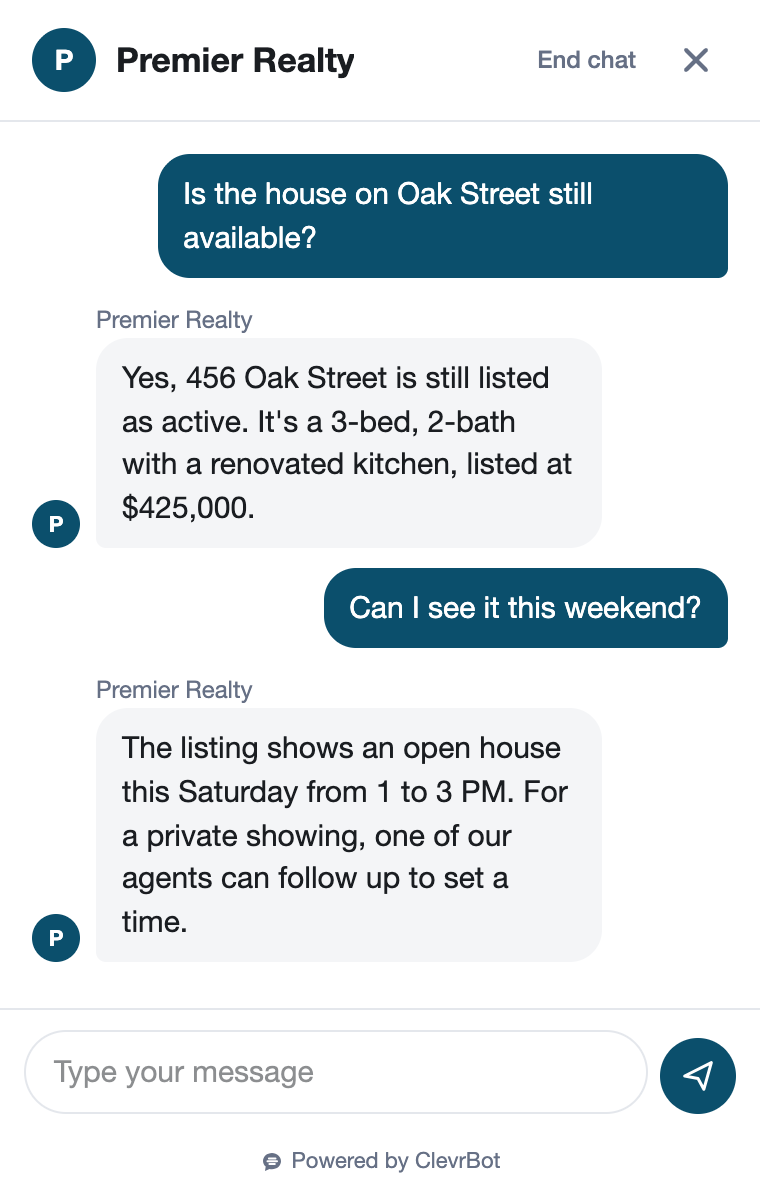
ClevrBot is a real estate chatbot for WordPress that learns your listing, neighborhood, buyer, and seller pages, then answers visitor questions 24/7. When someone is ready to talk, it captures their email so you can follow up.
51%
of recent buyers found the home they bought on the internet.
Source: NAR 2025 Home Buyers and Sellers Generational Trends
75%
of buyers interviewed only one agent before choosing who to work with.
Source: NAR 2025 Home Buyers and Sellers Generational Trends
95%
of buyers call responsiveness a “very important” quality in an agent.
Source: NAR 2025 Home Buyers and Sellers Generational Trends
What visitors ask
What Buyers and Sellers Ask a Real Estate Chatbot
These questions show up again and again on real agent and brokerage FAQ pages, so each one needs a clear answer somewhere on your site.
Listings and showings
Is the house on Maple Street still available?
Answered from: the listing page, with its status in the description
What are the HOA dues and property taxes on this one?
Answered from: the listing description
Can I see it this Saturday?
Answered from: your contact page, which tells visitors what details to share
Do I have to sign something before you show me a house?
Answered from: your “How we work with buyers” page
Buying a home
Do I need to be pre-approved before I tour homes?
Answered from: your buyer guide
How much earnest money will I need?
Answered from: your buyer guide or local market FAQ
Who pays the buyer’s agent now?
Answered from: your buyer agreement and fees page
What closing costs should I expect?
Answered from: your buyer guide
Selling and your team
What’s my home worth?
Answered from: your seller page, which invites them to share the address
How will you market my house?
Answered from: your seller services page
Do you work in Northside and Riverbend?
Answered from: your service area and neighborhood pages
Does anyone on your team speak Spanish?
Answered from: your agent bio pages
Before and after
What Happens to a Sunday Night Listing Question
The couple who toured three open houses
A couple toured three open houses on Sunday afternoon. At 9:40 PM they’re on your site looking at a fourth listing. Before they reach out, they want to know the HOA dues and whether they need a pre-approval letter to see it.
Without ClevrBot
- They scroll the listing and your buyer page but can’t find the HOA amount
- Your contact form asks them to write a message, so they close the tab
- They ask the same question through a portal and reach another agent first
- You see the visit in analytics on Monday, with no name attached
With ClevrBot
- ClevrBot answers the HOA question from the listing description
- It explains your pre-approval advice from your buyer guide
- They leave an email address and ask about a Saturday showing
- You get an email alert and the full chat recap before you start work Monday
Setup guide
How to Set Up Your Real Estate Chatbot
Installing takes a few minutes, so spend your time on the pages it learns from and the gaps buyers ask about most.
Install the plugin and pick your content
Upload the ClevrBot plugin to WordPress, then choose the post types it learns from, including your theme’s listing post type if it has one. If your listings load from an IDX feed or search widget, ClevrBot usually can’t read them. Create your own pages for featured and exclusive listings instead.
Write listing facts as text
ClevrBot reads the words on your pages, not photos or PDF flyers. Put price, beds, baths, square footage, HOA dues, taxes, and status in each listing description. When a home goes pending, update the page and refresh your content in ClevrBot.
Clear out old pages
ClevrBot learns every published page in the post types you choose, even pages your menu doesn’t link to. Unpublish sold listings, past open house posts, and stale market reports so it never calls a sold home available.
Answer what buyers and sellers actually ask
Add a plain-language buyer guide covering pre-approval, earnest money, closing costs, and your written buyer agreement. Then add a seller page that explains how you price and market homes. Write it the way you’d explain it on the phone.
Keep neighborhood pages factual
Describe parks, commute times, shopping, HOA rules, and new construction. For schools and crime, link to the school district and official crime data instead of calling an area “safe” or “great for families.” ClevrBot answers from your content, so neutral pages lead to neutral answers.
Tell visitors how to reach you
After a visitor’s first message, ClevrBot asks for an email address (name optional), or you can require a name and email before anyone chats. Your contact page shapes what ClevrBot says about next steps, so spell it out: “Leave your email and the address you’re asking about, and an agent will reply within two hours.” Before going live, test it in Preview only mode with twenty real questions from your inbox.
Know the limits
What ClevrBot Won’t Do (and What to Do Instead)
It won’t set showing times or sign buyer agreements
Instead: ClevrBot captures the visitor’s contact info, and your team confirms the time and handles the paperwork.
It can’t tell someone what their home is worth
Instead: Explain how you price homes on your seller page, and let ClevrBot collect the address and contact info so you can prepare a market analysis.
It only knows what your site says
Instead: It won’t see MLS changes, IDX feeds, or price cuts that aren’t on your pages. Keep status and price current, and refresh your content after changes.
Fair Housing applies to every answer
Instead: Keep your pages free of language about who a neighborhood suits, and point school and crime questions to the same official sources for everyone. ClevrBot repeats your content, so neutral, consistent pages are your best safeguard against steering.
It doesn’t give legal, tax, or lending advice
Instead: Explain the basics on your pages, and send contract, tax, and loan questions to a licensed professional.
Getting started
How It Works
Install the Plugin
Works with any WordPress theme.
Select Your Content
Choose which pages to index.
Start Capturing Leads
Answer questions 24/7.
Can ClevrBot answer questions about my IDX listings?
ClevrBot learns the WordPress post types you select, plus any folders of static HTML files you add. Listings pulled in through an IDX iframe or search widget usually aren’t stored as WordPress content, so it can’t read them. For the listings you care about most, publish your own listing pages with the key facts written out.
Is a chatbot for real estate a Fair Housing risk?
Any tool that talks to the public can repeat problems that already exist in your content. ClevrBot answers from your own pages, so the fix is the same as for your website. Describe homes and areas objectively, skip opinions about who fits where, and send school and crime questions to official sources for every visitor.
Can an AI chatbot for real estate replace my ISA or lead team?
No, and it shouldn’t try. ClevrBot handles the first questions at any hour and captures contact info, so your team starts with a warm lead and the full conversation. If you set up live chat handoff, a team member can also take over a chat while it’s happening.
Does ClevrBot work for buyers on their phones?
Yes, ClevrBot works on phones, tablets, and desktops, with a “Chat with us” button in the corner of every page. Buyers can ask about a listing without leaving it. NAR’s research shows that looking online for homes is the most common first step buyers take.
Can it answer in Spanish or other languages?
Yes. ClevrBot recognizes the language a visitor types in and translates its answers, so a buyer who writes in Spanish, Vietnamese, or Portuguese gets a reply they can read. Your team still gets the visitor’s contact info and the conversation recap, just like any other chat.
How much does ClevrBot cost?
You can start free with 100 messages and no credit card. The Starter plan is $49 a month for 1,000 messages and up to 1,000 source pages, and extra packs of 500 messages roll over month to month. Plans are billed monthly, and you can cancel anytime.
Answer Tonight’s Buyers Before Monday Morning
Start with 100 free messages. No credit card required.