INSURANCE CHATBOT
Insurance Chatbot for Independent Agents and Agencies
ClevrBot is an insurance chatbot for independent agencies that answers shoppers and clients from your own carrier, coverage, and service pages, day or night. It captures contact info so a licensed agent can follow up, and it never quotes, binds, or handles claims.
3.5
The average number of quotes auto insurance customers now receive, the highest in the study’s history.
20%
of auto insurance shoppers also got a homeowners quote, even though 45% have a homeowners policy.
62%
of all property and casualty insurance written in the U.S. in 2025 was placed by independent agencies.
Source: Big “I” 2026 Market Share Report
What visitors ask
What shoppers and clients ask an insurance chatbot
These come from real independent agency FAQ and service pages, split between people shopping for coverage and clients who already have a policy with you.
Shopping for coverage
Which insurance companies do you work with?
Answered from: carriers page
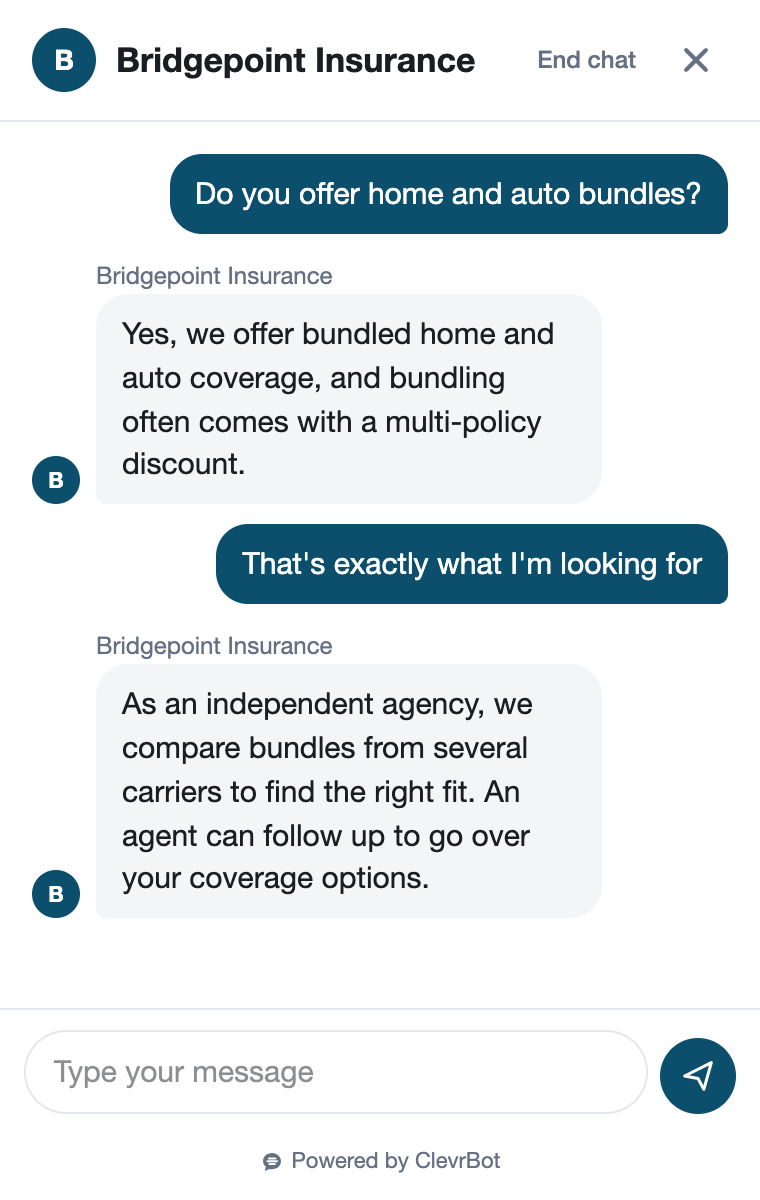
Can you bundle my home and auto?
Answered from: personal lines pages
Do you write coverage for contractors?
Answered from: commercial lines pages
Do I need flood insurance outside a high-risk zone?
Answered from: flood insurance page
How your agency works
Does it cost more to use an independent agent?
Answered from: “why an independent agent” page
Do you charge a broker fee?
Answered from: fees FAQ
What do you need from me to get a quote?
Answered from: quote request page
Which states are you licensed in?
Answered from: About page
Existing clients
How do I report a claim at 11 PM?
Answered from: carrier claims contacts page
Where do I pay my bill?
Answered from: carrier billing links page
How do I get proof of insurance for my closing?
Answered from: realtor and lender service page
Can I cancel before my policy renews?
Answered from: client service FAQ
Before and after
A renewal notice on a Sunday night
The homeowner who wants a second opinion
A homeowner opens a renewal notice with a steep increase on Sunday night. They want to know if an independent agent can shop their home and auto together before the renewal date. Your office is closed until Monday.
Without ClevrBot
- They find your quote form but not which carriers you work with
- They can’t tell whether an independent agent costs extra
- They collect auto quotes from carrier apps and never ask about home
- They renew as is, or buy from whoever answered first
With ClevrBot
- ClevrBot lists your home and auto carriers from your carriers page
- It explains how your agency is paid, using your own “why independent” page
- It tells them what to have ready, like their current declarations pages and renewal date
- It captures their email and name, and a licensed agent follows up Monday morning
Setup guide
How to set up your insurance chatbot
ClevrBot answers only from the WordPress pages and files you select. Your job is making sure the right pages exist and say what your agents would say.
Publish a carrier list
“Which companies do you work with?” is one of the first questions people ask an independent agency. List your carriers by line: personal, commercial, life, and specialty. Update the page whenever your carrier lineup changes, since ClevrBot repeats what it says.
Give each line of business its own page
Write a page for home, auto, umbrella, flood, and each commercial niche you want, like contractors or restaurants. Say who you write, which states you’re licensed in, and what you need to get started. Specific pages get specific answers.
Add a claims and billing contacts page
Many agencies already list each carrier’s claims number and payment link on one page. At 11 PM a client needs the carrier’s claims line, not your office voicemail. ClevrBot can share it the moment they ask.
Explain how you get paid
Shoppers want to know whether an agent costs extra. Publish how commissions work, whether you charge any fees, and when you would disclose one. Clear answers here remove a common reason people leave for a direct carrier.
Tell visitors what not to share in chat
Ask them not to type policy numbers, driver’s license numbers, or Social Security numbers into the chat. Your agents collect those through your normal secure process. Put that note on your contact or quote request page so ClevrBot repeats it.
Clean out old pages, then test
Unpublish promotions for carriers you no longer represent, since ClevrBot learns from published pages even when nothing links to them. Ask the questions above and read the answers in your chat history. Upload your content again after every change, since refreshes are on-demand.
Know the limits
What ClevrBot will not do for your agency
It does not quote rates or premiums
Instead: It explains how your quoting works and what you need from the visitor. A licensed agent prepares every quote.
It does not bind, change, or cancel coverage
Instead: Nothing said in chat puts coverage in force. Only your agents and the carrier can bind or change a policy, and advice about a specific situation should come from a licensed agent.
It does not handle claims
Instead: It shares the carrier claims contacts listed on your site. The carrier takes the claim from there.
It does not decide what a policy covers
Instead: “Is my water damage covered?” depends on the policy wording and the facts. ClevrBot shares general information from your pages and captures contact info so an agent can review the policy.
It only knows what your site says
Instead: If your carrier list or licensed states are out of date, so are its answers. Update the page and upload your content again.
Getting started
How It Works
Install the Plugin
Works with any WordPress theme.
Select Your Content
Choose which pages to index.
Start Capturing Leads
Answer questions 24/7.
Can an insurance chatbot give quotes?
ClevrBot never quotes premiums, compares rates, or binds coverage. It answers the questions that come before a quote, like which carriers you work with, which lines you write, and what information you need. Then it captures the visitor’s email and name so a licensed agent can prepare the quote.
Will it tell a client whether a claim is covered?
No, coverage depends on the policy wording and the facts, which is work for your agents and the carrier. ClevrBot can share general information from your coverage pages and the carrier’s claims contact. For anything about the client’s own policy, it points them to a licensed agent.
Does it work for commercial lines?
Yes, as long as your site has the pages. Commercial buyers ask about the classes of business you write, the coverages each one needs, and how to get a certificate of insurance. Give each niche its own page, and ClevrBot answers from it while your team issues the actual certificates.
Can it answer in Spanish or other languages?
Yes, ClevrBot recognizes the visitor’s language and replies in it, using your English pages as the source. That helps agencies serving bilingual communities. Make sure someone on your team can follow up in that language when the conversation moves to a person.
How do I know when a prospect leaves their info?
Turn on email notifications to get an alert as soon as a conversation starts. Every chat is saved in your ClevrBot chat history in WordPress, along with any email and name the visitor shared. Your team then follows up and adds the lead to your agency management system.
Is my agency’s content used to train AI models?
No. ClevrBot uses third-party AI models, but your data is not used to train any models, and it is protected with access controls and encryption. ClevrBot uploads only the pages and files you select, so leave out anything you don’t want visitors to see.
What does it cost?
The Free plan includes 100 messages, and no credit card is needed. The Starter plan is $49 per month for 1,000 messages and includes setup support, with no contract. Extra 500-message packs roll over month to month, as shown on the pricing page.
Put an insurance chatbot on your agency site
Install the WordPress plugin, pick your pages, and start with 100 free messages. No credit card required.