HOTEL CHATBOT
A Hotel Chatbot for Independent Hotels, Inns, and B&Bs
ClevrBot is a hotel chatbot for WordPress that learns your room, policy, dining, and local guide pages, then answers guest questions 24/7. It doesn’t take reservations; it answers the questions that keep guests from reserving and captures contact info for follow-up.
$516
average value per booking made on hotel websites in 2025, the highest of any booking source.
Source: SiteMinder Hotel Booking Trends
18%
of travelers who start their search on an OTA will book directly with the hotel.
80%
of travelers now want AI-powered capabilities in their booking journey.
What visitors ask
What Guests Ask a Hotel Chatbot
These come from real inn, B&B, and resort FAQ pages and travel forums, grouped by where the answer should live on your site.
Before they reserve
Is parking free, or is there a daily fee?
Answered from: your parking and directions page
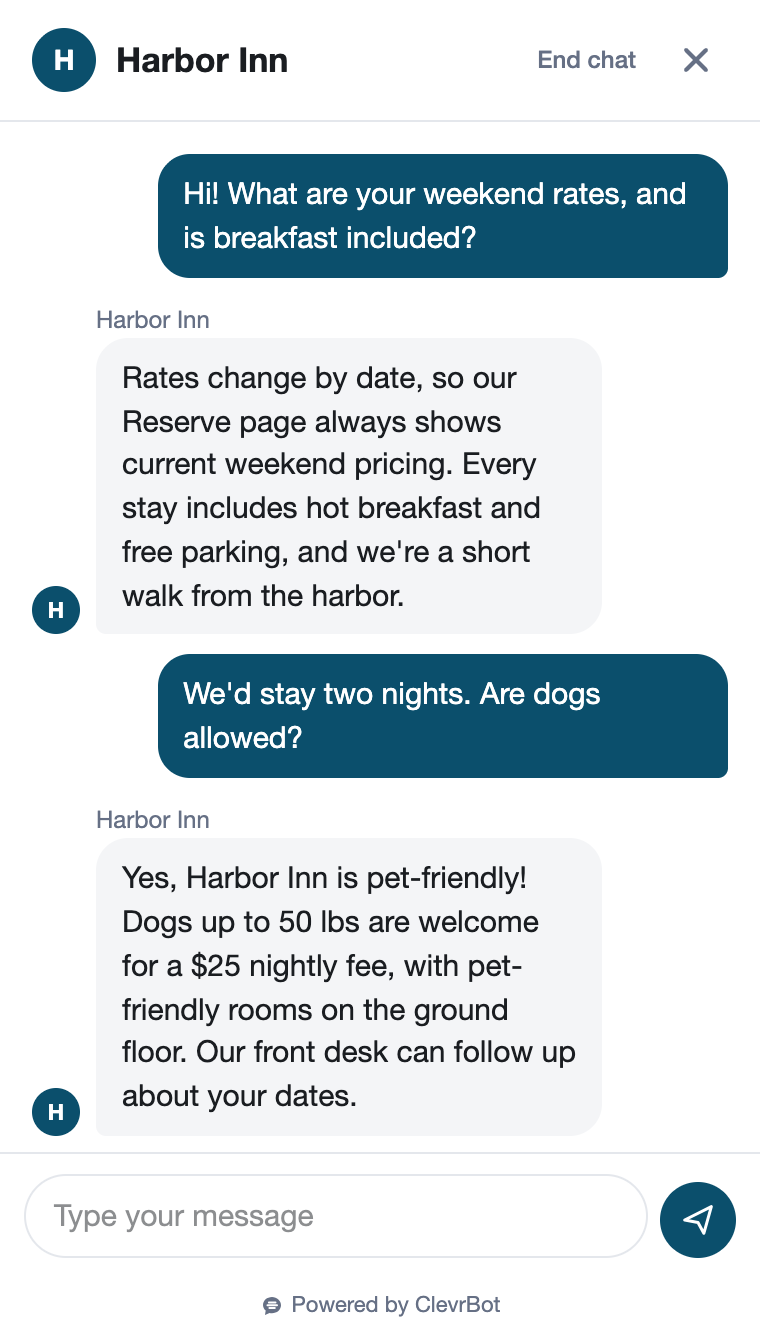
Do you allow dogs, and what’s the pet fee?
Answered from: your pet policy
Are children welcome, and is there an age minimum?
Answered from: your policies page
Is there a resort fee or anything not shown in the rate?
Answered from: your policies or fees page
Planning the stay
What time is check-in, and can I drop my bags early?
Answered from: your policies page
What if I arrive after the front desk closes?
Answered from: your arrival or late check-in page
What time is breakfast, and can you handle a gluten allergy?
Answered from: your breakfast or dining page
Is there an elevator or a ground-floor room?
Answered from: your room and accessibility pages
Policies and the area
What is your cancellation policy?
Answered from: your policies page
How far are you from downtown or the stadium?
Answered from: your location and local guide pages
Do you host small weddings or family reunions?
Answered from: your events page
Is there a two-night minimum on weekends?
Answered from: your policies page
Before and after
The Guest Who Found You on a Travel Site
A Friday-night comparison shopper
A couple found your inn on a big travel site and opened your website in a second tab. They want to know if their small dog can come, whether breakfast works with a gluten allergy, and what happens if they arrive at 10 PM. If your site doesn’t answer quickly, they’ll reserve through the tab they already have open.
Without ClevrBot
- They click through four pages and never find your late-arrival steps
- The phone rings after the front desk closes and goes to voicemail
- They reserve through the travel site, and you pay its commission
- You meet them at check-in, with no chance to share your direct-booking perks
With ClevrBot
- ClevrBot answers the dog question from your pet policy, fee included
- It explains gluten-free breakfast options from your dining page
- It shares your late-arrival steps and where to see live rates
- They leave an email for a follow-up about a quiet room, and your team replies in the morning
Setup guide
How to Set Up Your Hotel Chatbot
The plugin installs in minutes, so put your effort into the pages guests read before they reserve.
Install the plugin and select your pages
Upload the ClevrBot plugin to WordPress, choose the pages and posts it learns from, and turn on the chat widget. Include room pages, policies, FAQ, dining, parking and directions, accessibility, events, and local guide posts.
Leave rates and availability to your booking engine
ClevrBot can’t see your booking engine, so it can’t check dates or hold rooms. Avoid exact nightly rates on regular pages, since rates change and ClevrBot would repeat the old number. Instead, add a clear line to your FAQ page that says where guests can see live rates.
Write one complete policies page
Cover check-in and check-out times, early arrival, late arrival, pets, children, smoking, deposits, cancellations, minimum stays, and every fee. Guests ask these questions most, so one page keeps every answer consistent.
Describe rooms in words
ClevrBot doesn’t read photos, and its current plans read HTML pages, not PDF brochures or breakfast menus. For each room, write out the bed type, maximum guests, bathroom type, stairs, view, and accessible features.
Retire old offers
ClevrBot learns every published page in the post types you choose, even ones your menu doesn’t link to. Unpublish last season’s packages and past event posts so it never promotes a deal you no longer offer.
Tell guests how to reach a person
On your contact page, ask guests to share their name, email, travel dates, and question, and say when the front desk replies. ClevrBot draws on that page when a guest wants to talk to someone.
Know the limits
What ClevrBot Won’t Do for Your Property
It doesn’t take reservations or payments
Instead: Guests reserve through your booking engine or by phone. ClevrBot points them to your booking page and captures contact info when they want a follow-up.
It can’t check availability or hold a room
Instead: It knows your pages, not your inventory. Say on your FAQ page where guests can check live availability.
Rates change, and your pages might not
Instead: Don’t publish exact nightly rates on pages you won’t update. Link to live rates instead, so ClevrBot never repeats an old price.
It won’t change or cancel a stay
Instead: Your cancellation policy page explains the rules, and changes go through your booking system or front desk.
It won’t promise a specific room
Instead: Describe accessible and specialty rooms in detail, then have a person confirm the room assignment before arrival.
Getting started
How It Works
Install the Plugin
Works with any WordPress theme.
Select Your Content
Choose which pages to index.
Start Capturing Leads
Answer questions 24/7.
Can guests reserve a room through ClevrBot?
No, ClevrBot answers questions from your website and captures contact info, but it doesn’t connect to your booking engine, take payments, or hold rooms. When a guest is ready, it points them to the booking page or phone number your site lists. That keeps every reservation, deposit, and change inside the system you already use.
Does a hotel chatbot make sense for a five-room B&B?
Yes. Small inns often have one person handling the phone, breakfast, and check-ins, so every repeat question takes time from guests in front of you. ClevrBot answers the common ones about parking, pets, children, and breakfast times, and the Free plan’s 100 messages let you test it with real guests first.
Will it answer international guests in their language?
Yes. ClevrBot recognizes the language a guest types in and translates its answers, so a traveler writing in German or Japanese gets a reply they can read. Your team still receives the guest’s contact info and the conversation recap, the same as any other chat.
What happens when a guest needs the front desk?
ClevrBot asks for the guest’s email, with an optional name. You get an email alert plus a conversation recap in your dashboard, so your team can reply with full context. If you set up live chat handoff, a staff member can also take over the chat while the desk is open.
Could ClevrBot give a guest the wrong rate?
Only if your pages show an old one. ClevrBot repeats what your website says, so a price on a forgotten package page can resurface months later. To prevent that, keep prices in your booking engine, link to it, and unpublish expired offers.
How much does ClevrBot cost?
You can start free with 100 messages and no credit card. The Starter plan is $49 a month for 1,000 messages and up to 1,000 source pages, and extra packs of 500 messages roll over month to month. Plans are billed monthly, and you can cancel anytime.
Answer Guests at 11 PM Without Staffing the Desk
Start with 100 free messages. No credit card required.