RESTAURANT CHATBOT
Restaurant Chatbot for Menu, Hours, and Allergy Questions
ClevrBot is a restaurant chatbot that answers guests from your own menu, hours, and FAQ pages while your team is busy on the floor. It never takes reservations, orders, or payments, and it captures contact info for private events and catering.
85%
of diners look at the menu online before trying a new restaurant, most of the time.
10.8%
of U.S. adults have a food allergy, and nearly 19% believe they do.
60%
of restaurant operators reported softer customer traffic in 2025.
Source: National Restaurant Association, 2026 State of the Restaurant Industry
What visitors ask
What guests ask a restaurant chatbot
These questions show up again and again on real restaurant FAQ pages, and each one has a natural home on your site.
Menu and dietary needs
Do you have gluten-free pasta?
Answered from: menu page
What can I eat if I’m vegan?
Answered from: menu page with dietary labels
Is your fryer shared with shellfish?
Answered from: allergen policy page
Are you running any specials this week?
Answered from: specials page
Planning a visit
Are you open on Mondays?
Answered from: hours and location page
Do you take walk-ins?
Answered from: reservations policy page
Where can I park?
Answered from: location page
Is there a dress code, and are kids welcome?
Answered from: FAQ page
Groups and extras
Can we host a private party for 30?
Answered from: private events page
What is your corkage fee?
Answered from: FAQ page
Can I bring my own birthday cake?
Answered from: FAQ page
Do you offer catering?
Answered from: catering page
Before and after
The party-of-12 question during the lunch rush
A birthday dinner with a tree nut allergy
On Thursday at noon, someone is planning a Saturday birthday dinner for 12, including a guest with a tree nut allergy. They want to know about a private room, your corkage fee, and which dishes are safe. Your host is seating a full lunch rush and can’t get to the phone.
Without ClevrBot
- The phone rings out while your host seats tables
- Your events page has a form but no room sizes or minimums
- The allergy question has nowhere to go, so they worry
- They pick the place down the street that picked up
With ClevrBot
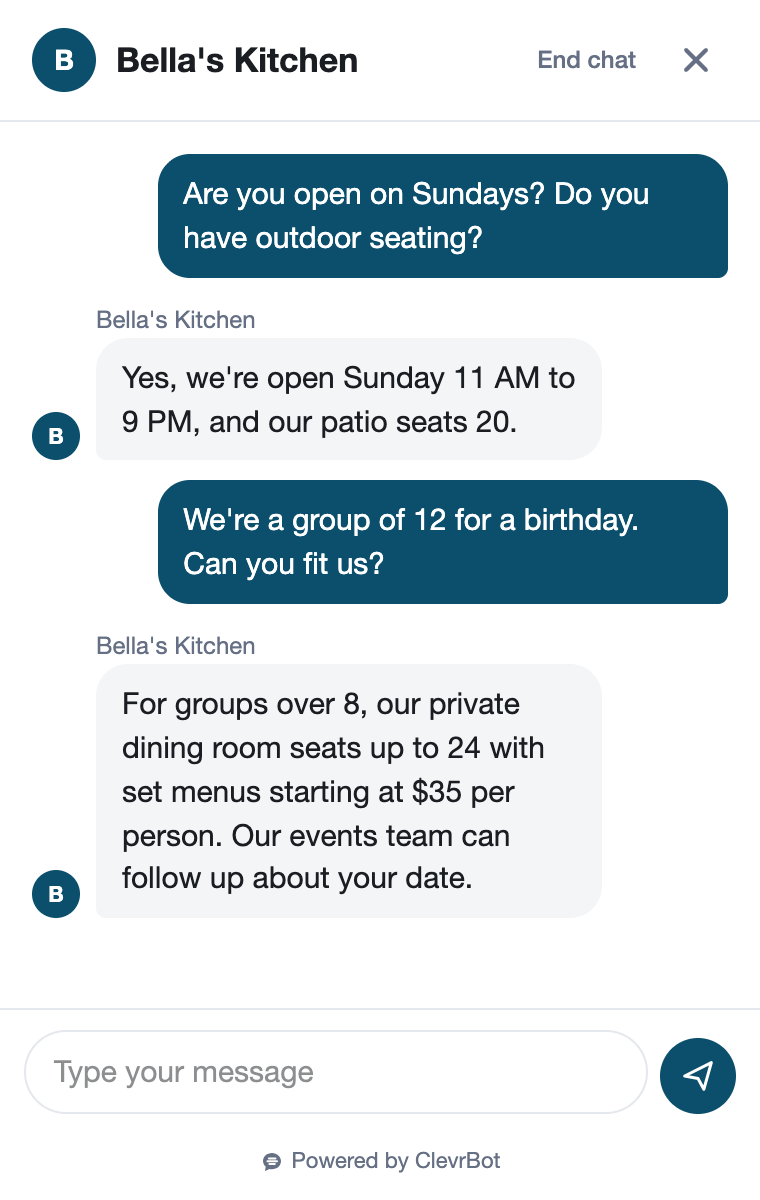
- ClevrBot shares your private room capacity and minimums from your events page
- It explains your corkage and cake policies from your FAQ page
- It shares your allergen policy and says a manager will confirm the menu for that guest
- It captures their email and name, and your events manager gets an email alert
Setup guide
How to set up your restaurant chatbot
ClevrBot answers only from the WordPress pages you select, and the biggest gap on most restaurant sites is a menu it can’t read.
Put your menu on a page as text
ClevrBot doesn’t read images, and the Free and Starter plans read HTML pages, not PDFs. If your menu is a photo or a PDF, add a text version to a WordPress page. Include dish names, short descriptions, and dietary labels like GF, V, and VG.
Write an allergen and dietary page
List which dishes contain the nine major food allergens, including peanuts, tree nuts, shellfish, and sesame. Explain how you handle cross-contact, like shared fryers and prep surfaces. End with a clear line asking guests with severe allergies to speak with a manager.
Keep hours current, including holidays
Add holiday hours and seasonal patio hours to your hours page. Content refreshes are on-demand, so upload your content again after every change. Unpublish old holiday pages, because ClevrBot learns from published pages even when nothing links to them.
Answer the questions your staff hears every day
Write short answers for corkage, cake fees, dress code, kids, pets, parking, accessibility, walk-ins, and the patio. The question list above is a good place to start. Each answer you publish is one less call during service.
Give private events and catering a real page
List room names, seated and standing capacity, food and beverage minimums, and what to include in an inquiry. Say who follows up and how quickly. When a guest asks, ClevrBot shares those details and captures their contact info for your events manager.
Explain how reservations and ordering work
If you use a reservation platform or an online ordering service, name it on your site and say how guests use it. ClevrBot then tells guests where to go. It does not hold tables or take orders itself.
Know the limits
What ClevrBot will not do for your restaurant
It does not take reservations
Instead: It explains your reservation policy and where to reserve, using your own pages. Your host stand or reservation platform holds the table.
It does not take orders or payments
Instead: It points guests to your online ordering page or phone number, as your site lists them.
It cannot promise a dish is allergen-free
Instead: Allergy answers come only from what you publish. Tell guests with severe allergies to confirm with a manager, and update your allergen page whenever a recipe or supplier changes.
It doesn’t know what’s 86’d tonight
Instead: Specials and sold-out dishes are only as current as your site. Update the specials page before service, or leave daily specials off.
It does not confirm private events
Instead: It captures the guest’s contact info. Your events manager confirms dates, deposits, and contracts.
Getting started
How It Works
Install the Plugin
Works with any WordPress theme.
Select Your Content
Choose which pages to index.
Start Capturing Leads
Answer questions 24/7.
Can a restaurant chatbot take reservations?
Not ClevrBot, which answers questions about your reservation policy from your own pages, like whether you take walk-ins and how large parties work. Guests still reserve through your phone line or reservation platform. For private events, ClevrBot captures the guest’s contact info so your events manager can follow up.
Will it answer allergy questions?
Yes, using the allergen information you publish, so it can say which dishes contain peanuts or shellfish if your menu page does. It should never be the final word on a severe allergy. Add a line to your site asking those guests to talk to a manager, and ClevrBot will pass it along.
My menu is a PDF. Can ClevrBot read it?
Not on the Free or Starter plan, which read HTML pages, and ClevrBot doesn’t currently read images. PDF support is listed for the upcoming Pro plan. The fix today is a text menu page in WordPress, which guests can also read without downloading a file.
Does it work for guests who don’t speak English?
Yes, ClevrBot recognizes the guest’s language and replies in it, using your English pages as the source. That helps spots in tourist areas and diverse neighborhoods answer hours, menu, and parking questions without translating the whole site. Visitors planning a trip can get answers before they ever call.
How do I see what guests are asking?
Every conversation is saved in your ClevrBot chat history in WordPress, and email notifications can alert you when one starts. Read the history each week. When guests keep asking something your site doesn’t cover, like a heated patio, add it to your FAQ page and upload your content again.
Can it handle more than one location?
Yes, if your locations share one WordPress site. Give each location its own page with its address, hours, parking, and menu differences, and ClevrBot answers from the page that matches the guest’s question. If your locations run separate websites, contact ClevrBot about the best setup before you install.
What does a chatbot for restaurants cost with ClevrBot?
The Free plan includes 100 messages, and no credit card is needed. The Starter plan is $49 per month for 1,000 messages and includes setup support, with no contract. If a busy season runs long, extra 500-message packs roll over, as shown on the pricing page.
Put a restaurant chatbot on your site before Friday night
Install the WordPress plugin, add your menu as text, and start with 100 free messages. No credit card required.