PROPERTY MANAGEMENT CHATBOT
A Property Management Chatbot for Renters, Residents, and Owners
ClevrBot is a property management chatbot for WordPress that answers questions about vacancies, pet policies, fees, and your management services from your own pages, 24/7. When someone wants a tour or a management proposal, it captures their contact info for your team.
59%
of US renter households have at least one pet.
94%
of renters agree that rental listings should clearly list all fees.
74%
of rental owners say customer service is their primary consideration when choosing a property manager.
What visitors ask
What People Ask a Property Management Chatbot
We pulled these from real property management FAQ pages and landlord forums, and each one has a natural home on your site.
Prospective renters
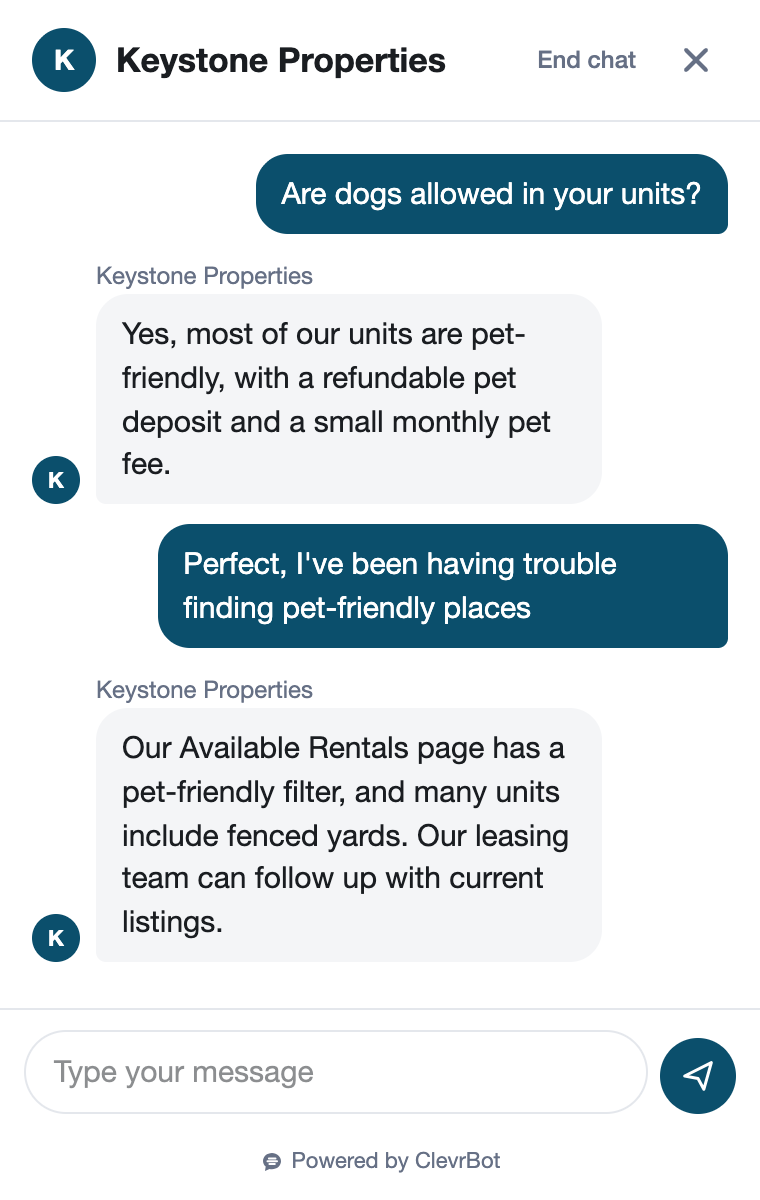
Do you allow dogs, and is there pet rent?
Answered from: your pet policy page
What do I need to qualify?
Answered from: your rental criteria page
What’s the application fee, and what do I pay before move-in?
Answered from: your fees and move-in costs page
Which utilities am I responsible for?
Answered from: the property listing or lease FAQ
Current residents
How do I submit a maintenance request?
Answered from: your resident page, with the portal link
What counts as an emergency after hours?
Answered from: your emergency maintenance page
When is rent due, and when do late fees start?
Answered from: your resident FAQ
How much notice do I give before I move out?
Answered from: your move-out page
Rental owners
What do you charge to manage a single-family home?
Answered from: your owner services and pricing page
Do you charge a management fee while the home is vacant?
Answered from: your owner pricing page
How long does it usually take to fill a vacancy?
Answered from: your leasing process page
Who approves repairs over a set dollar amount?
Answered from: your owner FAQ
Before and after
The Renter Who Won’t Wait Until Morning
A two-bedroom, a big dog, and 8:15 PM
A nurse coming off a late shift finds your listing for a two-bedroom on Maple Avenue. She has a 60-pound dog and a budget with no room for surprise fees. Before she tours, she wants to know if the dog is allowed and what move-in will really cost.
Without ClevrBot
- The listing says “pets negotiable,” with no weight limit or fees
- Your office is closed, and the voicemail promises a callback
- She applies at the building down the street that lists its pet rent
- Your leasing agent calls back the next day, after she’s moved on
With ClevrBot
- ClevrBot answers from your pet policy, including the weight limit and pet rent
- It lists the application fee, deposit, and move-in costs from your fees page
- She leaves her email address and asks for a tour
- Your leasing agent reads the chat recap and emails her first thing
Setup guide
How to Set Up a Property Management Chatbot That Gives Straight Answers
The plugin installs in minutes, and its answers are only as good as your pages, so start with the ones renters and owners ask about most.
Install the plugin and choose your pages
Upload the ClevrBot plugin to WordPress, select the pages and posts it learns from, and turn on the chat widget. Include your pet policy, rental criteria, fees, resident FAQ, and owner services pages.
Give vacancies their own page
Many property management sites embed listings from their software, and those widgets usually aren’t part of your page text. Keep an “Available Rentals” page with rent, deposit, pet rules, and move-in date written out for each unit. Update it the day a unit leases, then refresh your content in ClevrBot.
Move PDF content onto pages
Rental criteria, pet addenda, and resident handbooks often live in PDFs, and ClevrBot’s current plans read HTML pages, not PDFs. Copy the key points onto a web page so ClevrBot can answer from them.
Publish every fee in one place
List the application fee, admin fee, security deposit, pet deposit, pet rent, utility charges, and any resident benefits package. Clear numbers let ClevrBot answer “What will I pay?” without guessing, and that’s exactly what renters want.
Label renter and owner pages clearly
Keep owner pricing, onboarding, and monthly reporting on pages marked “For Owners.” Keep leasing and resident topics on their own pages, so each audience gets answers meant for them.
Tell visitors what to share
Put your emergency maintenance number on your resident page so ClevrBot can repeat it at 2 AM. ClevrBot asks each visitor for an email after their first message, and your contact page can ask for the property address and whether they rent or own.
Know the limits
Where ClevrBot Stops and Your Team Takes Over
It doesn’t approve or deny applicants
Instead: ClevrBot can repeat your published rental criteria, but screening decisions stay with your team. Make sure no page implies that someone will or won’t qualify.
Fair housing applies to every answer
Instead: Write criteria, pet rules, and neighborhood descriptions that apply to everyone. Give assistance animals and housing vouchers their own lines on your policy pages that point people to your office, and have your fair housing counsel review the wording.
It doesn’t take maintenance requests or rent payments
Instead: It points residents to your portal and repeats your emergency line, and your team handles the work order.
It doesn’t see live availability
Instead: It only knows what your pages say, so update or unpublish a listing when the unit leases, then refresh your content in ClevrBot.
It won’t price a management contract
Instead: Owners get what your owner page says about fees, and ClevrBot captures their details so you can send a proposal.
Getting started
How It Works
Install the Plugin
Works with any WordPress theme.
Select Your Content
Choose which pages to index.
Start Capturing Leads
Answer questions 24/7.
Can ClevrBot read the listings from my property management software?
ClevrBot learns the WordPress post types you choose, plus any folders of static HTML files you add. Listings that load inside an embedded widget or iframe usually aren’t part of your page text, so it can’t see them. Add a simple rentals page with the facts written out, and keep it current.
Will a property management chatbot replace my leasing team?
No. ClevrBot handles the repeat questions at any hour and captures contact info, so your team starts each follow-up with the renter’s email and the full conversation. If you set up live chat handoff, someone on your team can also take over a chat during office hours.
Will ClevrBot answer renters in Spanish?
Yes. ClevrBot recognizes the language a visitor types in and translates its answers, so a renter who writes in Spanish gets a reply in Spanish. Your leasing team still receives the renter’s contact info and the full conversation, the same as any other chat.
Can residents report a maintenance emergency through the chat?
ClevrBot doesn’t create work orders. It can repeat what your pages say: what counts as an emergency, the after-hours phone number, and the link to your resident portal. Put that information on a resident page, so the answer is right at 2 AM, when it matters most.
What happens when someone asks about vouchers or assistance animals?
ClevrBot answers from what your pages say, so publish clear, reviewed wording on both topics. The safest pattern is a short statement that invites people to contact your office, where a trained team member can respond. Also, avoid blanket “no pets” language that could read as applying to assistance animals.
Is renter and owner information safe?
ClevrBot follows industry-standard practices, including access controls and encryption, and your data isn’t used to train any AI models. Even so, only add pages you want public. Never include tenant records, owner statements, or anything that sits behind your portal login.
How much does ClevrBot cost?
You can start free with 100 messages and no credit card. The Starter plan is $49 a month for 1,000 messages and up to 1,000 source pages, and extra packs of 500 messages roll over month to month. Plans are billed monthly, and you can cancel anytime.
Answer Tonight’s Renters Before Someone Else Does
Start with 100 free messages. No credit card required.