LAW FIRM CHATBOT
Law Firm Chatbot for Prospective Client Questions
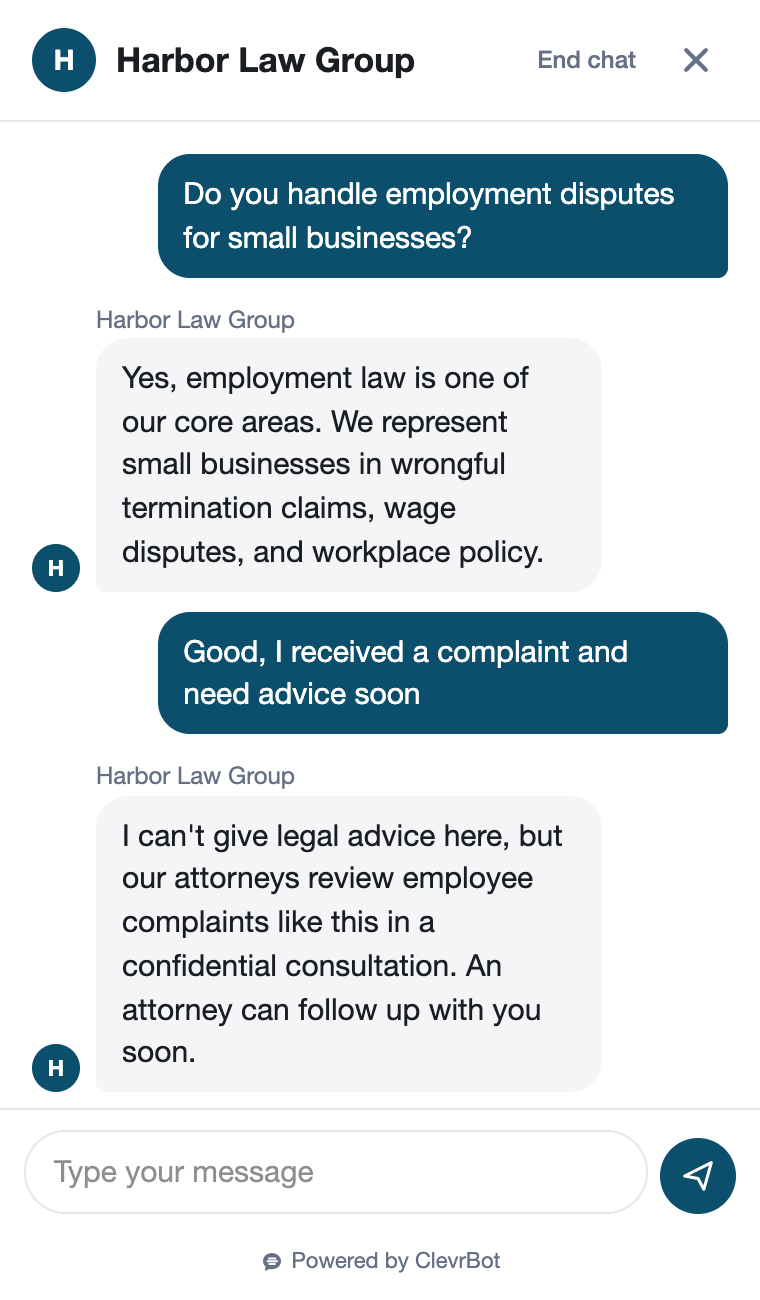
ClevrBot is a law firm chatbot that answers prospective clients from your own practice area, attorney, and fee pages at any hour. It captures their contact info for your intake team and never gives legal advice.
33%
of 500 law firms answered a secret shopper’s email inquiry in 2024, down from 40% in 2019.
Source: Clio 2024 Legal Trends Report
30%
of law firm websites give clear guidance on how to hire the firm, and just 14% show pricing.
Source: Clio 2024 Legal Trends Report
51%
of clients find chatbots useful for exploring legal options, while 67% still want a way to reach a human.
Source: Clio 2024 Legal Trends Report
What visitors ask
What prospective clients ask a law firm chatbot
These questions come from the FAQ pages of working law firms, and each one maps to a page your site can answer from.
Fit and experience
Do you handle trucking accident cases?
Answered from: practice area pages
Do you take clients in my county?
Answered from: office location and service area pages
Which attorney would work on my case?
Answered from: attorney bio pages
How long have your lawyers been practicing?
Answered from: attorney bios and About page
Fees and cost
Is the first consultation free?
Answered from: consultation or contact page
Do you work on a contingency fee?
Answered from: fees page
Do you offer payment plans for a retainer?
Answered from: fees and billing FAQ
If I lose, do I still owe case costs?
Answered from: fees and billing FAQ
Process and next steps
How long does a case like mine usually take?
Answered from: practice area FAQs
Do most cases like mine settle or go to trial?
Answered from: practice area FAQs
What should I bring to my consultation?
Answered from: new client page
When will someone call me back?
Answered from: contact page
Before and after
A Sunday night search, answered before Monday
The adjuster called with an offer
A driver was rear-ended on Friday. On Sunday night the other driver’s insurer calls with a quick settlement offer, and they start searching for a lawyer before they sign anything. They land on your site with three questions and nobody to call.
Without ClevrBot
- They can’t tell if you handle car accidents in their county
- They find no fee details and assume they can’t afford you
- Your contact form asks for case details and promises nothing
- They email two more firms, and the first one to reply gets the call
With ClevrBot
- ClevrBot confirms you handle auto accident cases, using your practice area page
- It explains your contingency fee terms exactly as your fees page states them
- It notes that the chat is general information, not legal advice, and forms no attorney-client relationship
- It captures their email and name, and your intake team gets an email alert
Setup guide
How to set up your law firm chatbot
ClevrBot installs as a WordPress plugin and answers only from the content you select, so setup is mostly about choosing and tightening that content.
Pick the pages it learns from
Select your practice area pages, attorney bios, fee and consultation pages, office locations, and FAQs. Leave out old blog posts about statutes that have since changed, because ClevrBot treats every page you select as current. Unpublish stale landing pages too, since ClevrBot learns from published pages even when nothing links to them.
Publish how your fees work
Clio found that only 14% of firm websites show pricing, so fee questions often go unanswered. Explain contingency percentages, flat fees, retainers, consultation costs, and payment plans in plain words. If you won’t publish numbers, say how fees are set and when you discuss them.
Post a clear disclaimer on your site
Add a short statement that your site offers general information, not legal advice, and that contacting you does not create an attorney-client relationship. Ask visitors not to share confidential details until you confirm you can take the matter. ClevrBot learns this page and repeats it when visitors ask.
Describe what happens after someone reaches out
Only 30% of firm websites clearly explain the hiring process. Spell out who calls back, how soon, what the consultation covers, and what to bring. Then, when a visitor asks what happens next, ClevrBot can tell them exactly.
Tell visitors what to share, and what not to
The chat widget asks visitors for an email and name so you can follow up. Say on your contact page that case details wait for your intake call and conflict check. ClevrBot answers from that page, so visitors hear the same guidance in chat.
Test it with real questions
Ask the questions from the list above, then read the answers in your chat history. Fill any gaps on your site and upload your content again, since refreshes are on-demand. Turn on email notifications so new conversations reach your intake team right away.
Know the limits
What ClevrBot will not do for your firm
It does not give legal advice
Instead: It shares general information from your pages. Questions about a visitor’s own facts go to an attorney after ClevrBot captures their contact info.
It does not create an attorney-client relationship
Instead: Keep a clear disclaimer on your site. Under the comment to ABA Model Rule 1.18, inviting details about a matter without clear warnings can make the sender a prospective client. Check your state’s version of the rule.
It does not run conflict checks or evaluate cases
Instead: Your intake team handles both on the callback. ClevrBot hands you the visitor’s contact info and the conversation.
It does not set consultation times
Instead: It captures the visitor’s email and name so your staff can reach out and arrange the meeting.
It only knows what your site says
Instead: If your fee terms or service area aren’t published, it can’t answer. Add them to your site and upload your content again.
Getting started
How It Works
Install the Plugin
Works with any WordPress theme.
Select Your Content
Choose which pages to index.
Start Capturing Leads
Answer questions 24/7.
Is a law firm chatbot allowed under ethics rules?
Rules vary by state, so check your bar’s guidance on lawyer advertising and prospective clients. ClevrBot answers only from content you publish, so the rules that already govern your website also govern its answers. Most firms pair it with a clear disclaimer that chat is general information, not legal advice, and creates no attorney-client relationship.
Will the legal chatbot give legal advice?
No, ClevrBot only explains what your pages say, such as which practice areas you handle, how your fees work, and what to bring to a consultation. When a visitor asks what to do about their own situation, it points them to your contact options. The chat widget also invites them to leave an email so an attorney can follow up.
Can it answer prospective clients in Spanish?
Yes. ClevrBot recognizes the visitor’s language and replies in it, drawing on your English pages. That helps firms serving Spanish-speaking communities answer first questions at night, so make sure your callback process can serve those clients in their language too.
What happens to the contact info it collects?
You get an email alert when a visitor starts a conversation, so your intake team can respond quickly. Every conversation, including the email and name the visitor shared, is saved in your ClevrBot chat history in WordPress. Your team follows up and adds the lead to your own intake system.
Does it work with my firm’s website?
ClevrBot is a WordPress plugin, so your site needs to run on WordPress. You upload the plugin, choose which pages and posts it learns from, and turn on the chat widget, which takes a few minutes. You can also set the widget color to match your firm’s branding.
What if someone needs help right away, like after an arrest?
ClevrBot can share your after-hours or emergency number if your site lists one, but it cannot reach an attorney on its own. If you set up live chat handoff, a visitor who asks for a person can be passed to someone on your team. Either way, put your urgent-line number and hours on your contact page so every late-night visitor gets it.
How much does it cost?
The Free plan includes 100 messages, and no credit card is needed. The Starter plan is $49 per month for 1,000 messages and adds setup support, with no contract. If a busy month runs long, you can buy 500-message packs that roll over, as shown on the pricing page.
Put a law firm chatbot on your site tonight
Install the WordPress plugin, pick your pages, and start with 100 free messages. No credit card required.